
Download Failed? Unable to Export?
Route: FAQ - [ Download Failed? Unable to Export? ]If you encounter issues exporting or downloading files while using DoingLabel's export function, the problem may stem from one of the following causes:
Cause 1: Insufficient Browser Memory Due to Oversized Export Files
When generating and exporting a large batch of files, selecting the UHD resolution option or embedding high-resolution large-size images in labels will consume significant browser memory. If your computer has insufficient available memory, this may result in export errors and failed downloads.
Solutions
- Export in Batches (Recommended)
Use the [Select Data Row Range] function under [Import Data] to split large datasets into smaller batches for sequential export.
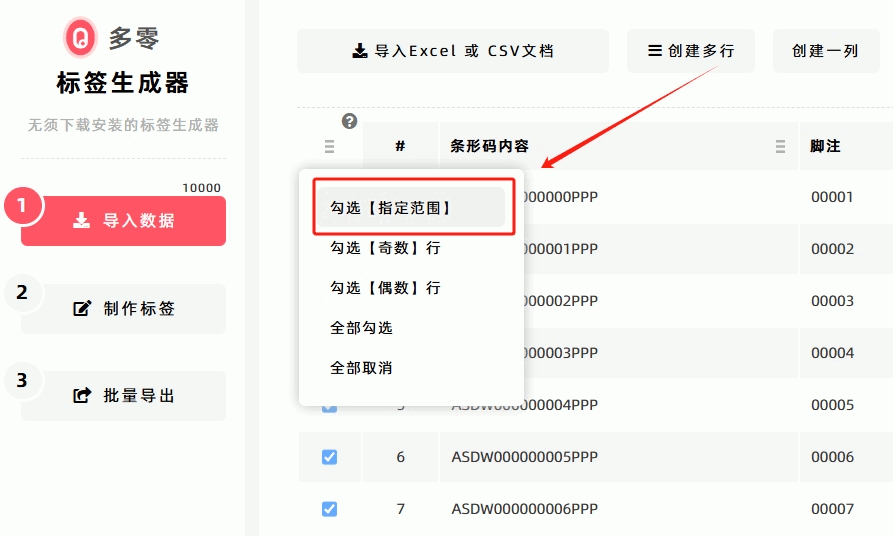 For detailed steps, click to view: How to Split Large Volumes of Data into Batches for Label Export or Printing.
- Switch to JPEG Format for Export
All batch image export functions on DoingLabel's Label Generator support PNG, JPEG and WEBP export formats. For large batch label image exports, DoingLabel recommend exporting in JPEG format. JPEG images feature a small file size and consume little memory during export, making large batch image exports feasible. If you properly lower the JPEG image quality, the generated JPEG files will be even smaller in size, with much higher export efficiency.
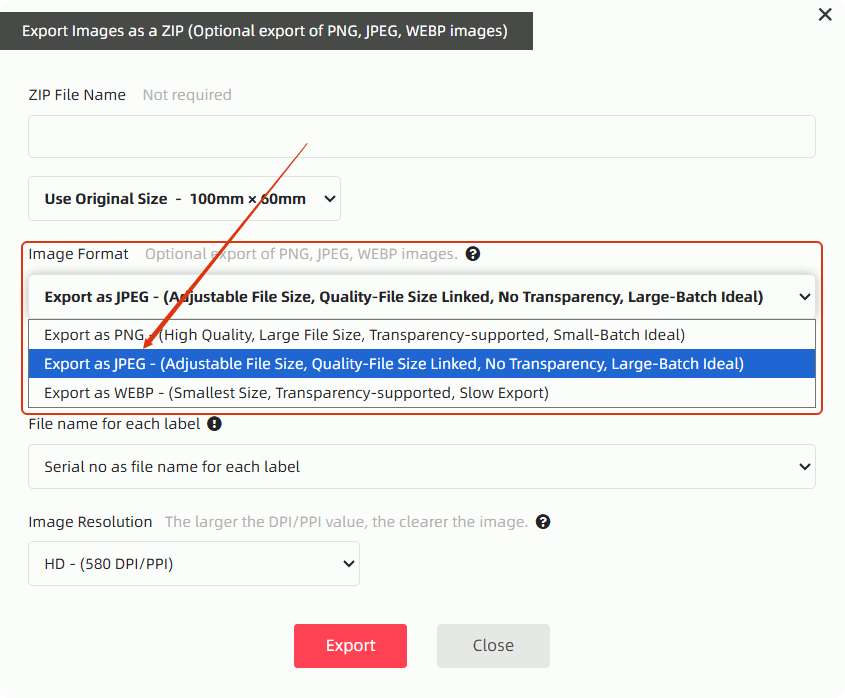
- Reduce Export Resolution
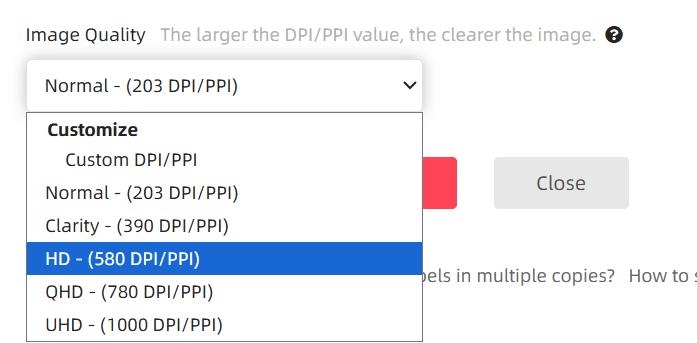
If it does not affect print quality, lower the export resolution (e.g., switch from UHD to HD) before exporting.
- Compress Images in Labels
Replace large high-resolution images embedded in labels with smaller-sized alternatives before batch export.
Cause 2: Cannot find the exported/downloaded file
DoingLabel’s export and download function relies on the browser’s built-in download feature, so it uses the browser’s default download settings. You can access your browser’s settings to find the file download path.
Click to learn: [How to Set the Save Path for Exported Files]
Cause 3: Your network environment blocks external file downloads
If your network environment has strict security requirements, it may automatically block external data transfers—including file downloads.
If this is the cause of your export/download failure, contact your network operations administrator, or switch to another network (e.g., mobile data) to export and download files.
Cause 4: Your browser does not support the new download protocol
Since January 30, 2023, DoingLabel has restructured and upgraded its export and download function and algorithms, switching from traditional download methods to a newer download protocol. For details, click [DoingLabel Has Restructured and Upgraded Export & Download Functions and Algorithms].
However, some customized, lightweight, or outdated browsers do not support this download protocol—such as the mobile version of QQ Browser and Internet Explorer (IE). If you are using these browsers, you will be unable to export and download files.
In addition, the mobile version of WeChat Browser does not support any file downloads. To use the export and download function, avoid using the mobile WeChat Browser.
DoingLabel recommends using mainstream, updated browsers such as Chrome, Edge, Firefox, Safari, and Opera—all of which support the new download protocol.
Cause 4: No response when initiating export/download
Some browsers perform a file scan before downloading, but lack obvious prompts during this process—making it seem like nothing happens when you click "Download".
The diagram below shows Firefox’s download process: the download progress is only displayed in the top-right corner, which is easily overlooked.
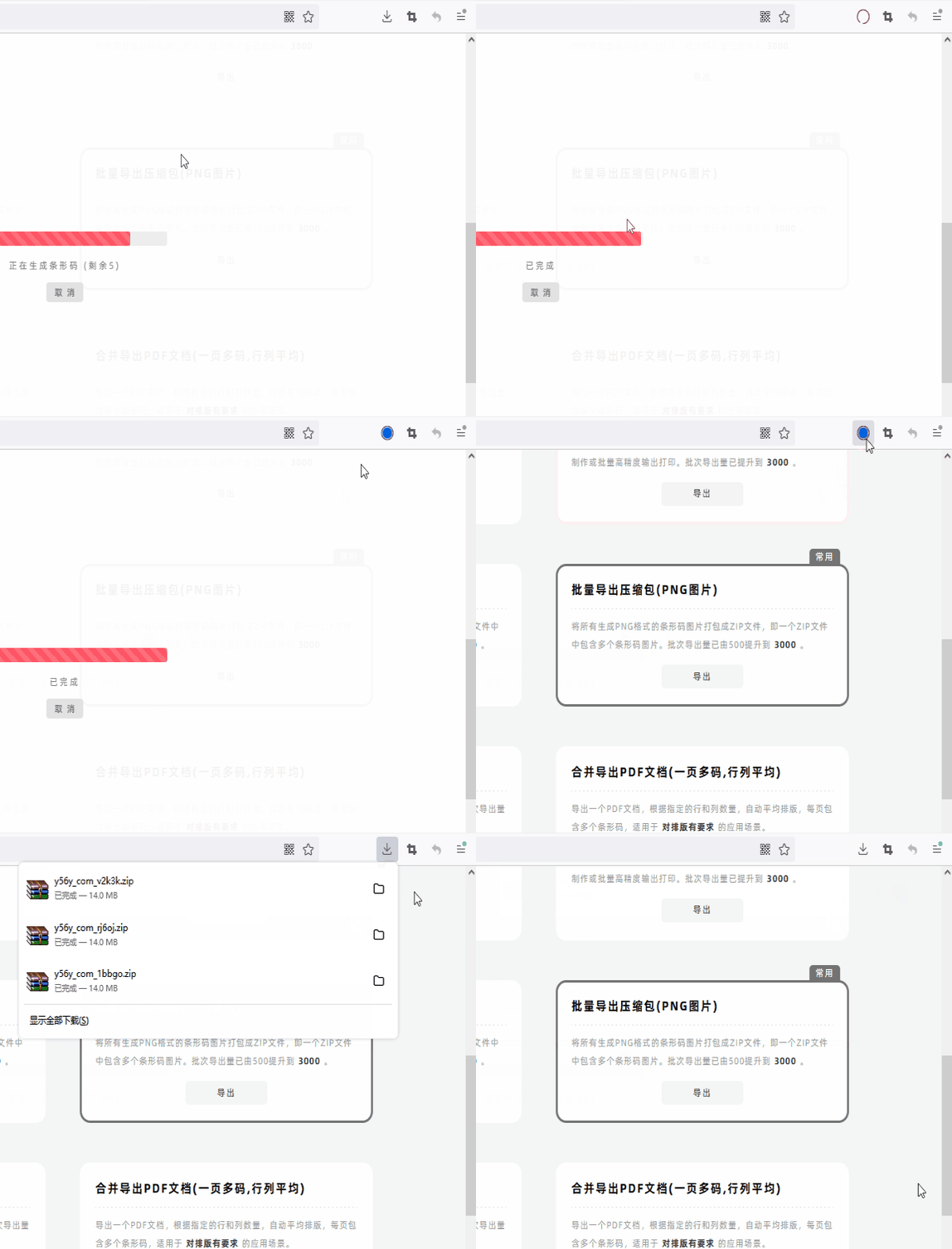
Click to learn more: [Why Do Some Browsers Show No Response When "Download" Is Clicked?]
---------------------------------
If you encounter an export/download issue that is not listed above, please provide feedback to DoingLabel. Be sure to include your contact email in the feedback, and DoingLabel will resolve the issue for you.
- Kindly refrain from reposting this article unless you have obtained permission.
- This is a translated article. Should you find any translation mistakes or content errors, please refer to the Original Article (Chinese), which takes precedence.
- Due to ongoing version iterations, the feature details and interface screenshots included in this article may not be updated in a timely manner, leading to potential discrepancies between the article content and the actual product. For the most accurate information, please refer to the features of the latest version.